Your medical career in Dubai starts with one crucial step, and waiting 45 days isn’t your only option. DataFlow verification is the mandatory Primary Source Verification (PSV) required by the Dubai Health Authority for all healthcare professionals seeking licensure in Dubai. This comprehensive guide walks you through the complete process, fast-track options available in 2026, and proven strategies to avoid common delays that cost applicants both time and money.
Whether you’re a doctor, nurse, pharmacist, or allied health professional, understanding the DataFlow process can reduce your verification timeline from 45 days to as little as 14 days with express services.
Based on current DHA requirements and official processing data, this guide provides everything you need for a smooth verification experience.
What is DHA DataFlow Verification?
DHA DataFlow verification refers to Primary Source Verification (PSV), a mandatory credential authentication process conducted by the DataFlow Group on behalf of the Dubai Health Authority. The process confirms the authenticity of your educational qualifications, professional licenses, and work experience by contacting issuing institutions directly.
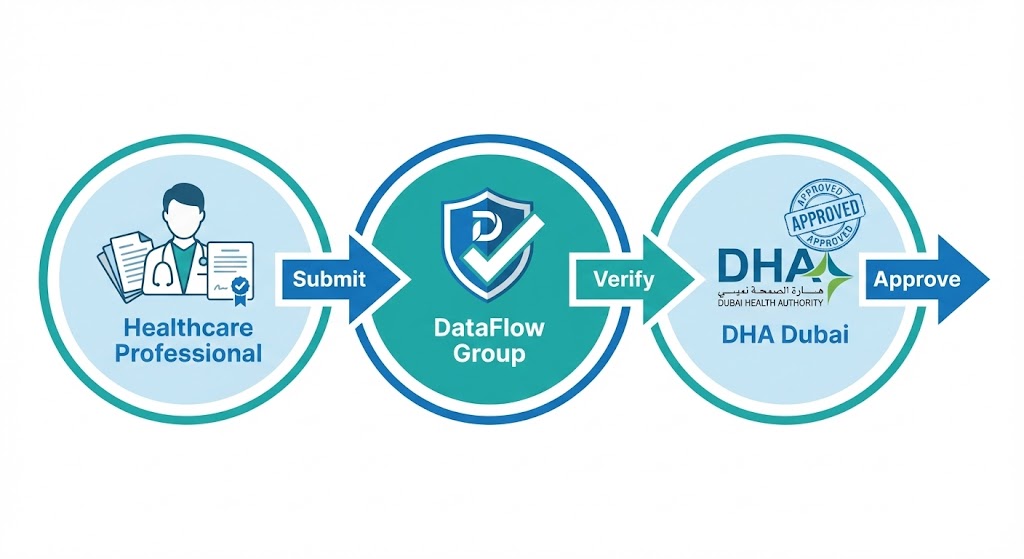
The DataFlow Group, established in 2007, operates as an ISO-certified verification company with a network spanning over 160,000 issuing authorities in more than 200 countries. For DHA licensing, they verify that healthcare professionals possess legitimate credentials before allowing them to practice in Dubai’s healthcare system.
All healthcare professionals require DataFlow verification, including doctors working as General Practitioners or in specialist and consultant roles, nurses at all levels from registered to specialist positions, dentists and dental specialists, pharmacists, and allied health professionals such as radiographers, physiotherapists, and laboratory technicians.
According to DHA guidelines, you cannot book your Prometric examination or proceed with licensure without completed PSV clearance.
The verification process typically takes 15-25 working days for standard processing, though realistic timelines often extend to 30-45 working days depending on issuing authority response times. Express service delivers results in 14 working days for professionals with urgent timelines.
How to Access DHA DataFlow Login Portal?
Creating Your DataFlow Account
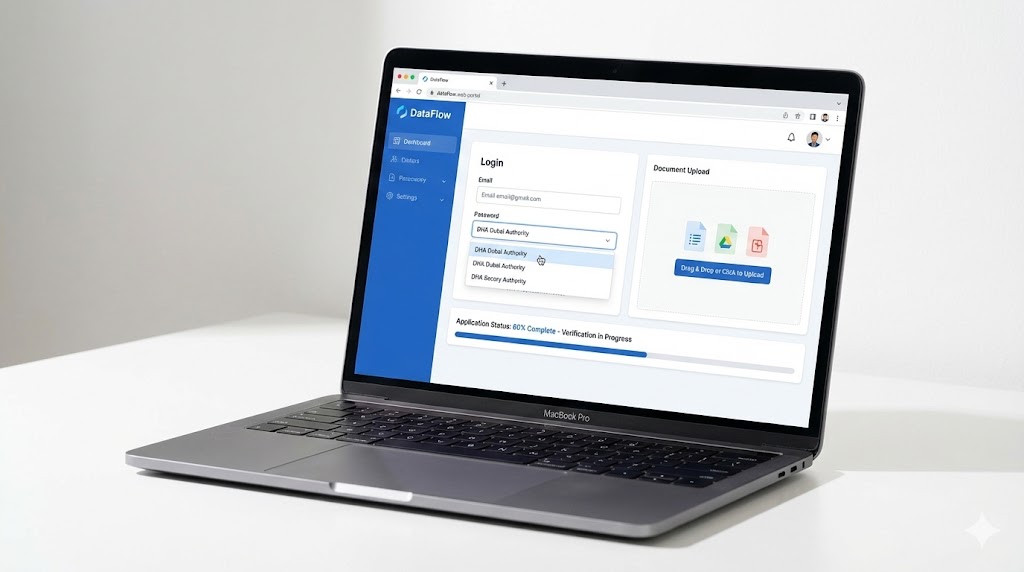
Begin your verification by visiting the official DHA portal at dha.dfgateway.com. Click “Register here” for new users and provide accurate personal details including your full name exactly as it appears on your passport, a valid email address, and a strong password meeting the portal’s security requirements.
After registration, DataFlow sends a verification email to your registered address. Click the activation link in the email to confirm your account, which typically arrives within minutes. This activation step is mandatory before you can access the portal or begin your application.
Before starting your DataFlow application, you must first register on the DHA Sheryan portal to obtain your DHA ID number. This unique identifier links your Sheryan account with your DataFlow verification, allowing DHA to access your PSV results directly.
Navigating the DataFlow Dashboard
Once logged in, the DataFlow dashboard displays several key sections. The main page shows your active cases, application status, and any pending action items requiring your response. The “Track Application” section allows you to monitor verification progress for each submitted document.
You can check your verification status by entering your DataFlow Case Number and passport number. The dashboard clearly indicates whether documents are “In Progress,” “Completed,” “Insufficient Information,” or “Rejected.”
Once verification completes, download your PSV report directly from the dashboard. This document is essential for your subsequent DHA licensing steps.
Complete Document Requirements for DHA DataFlow
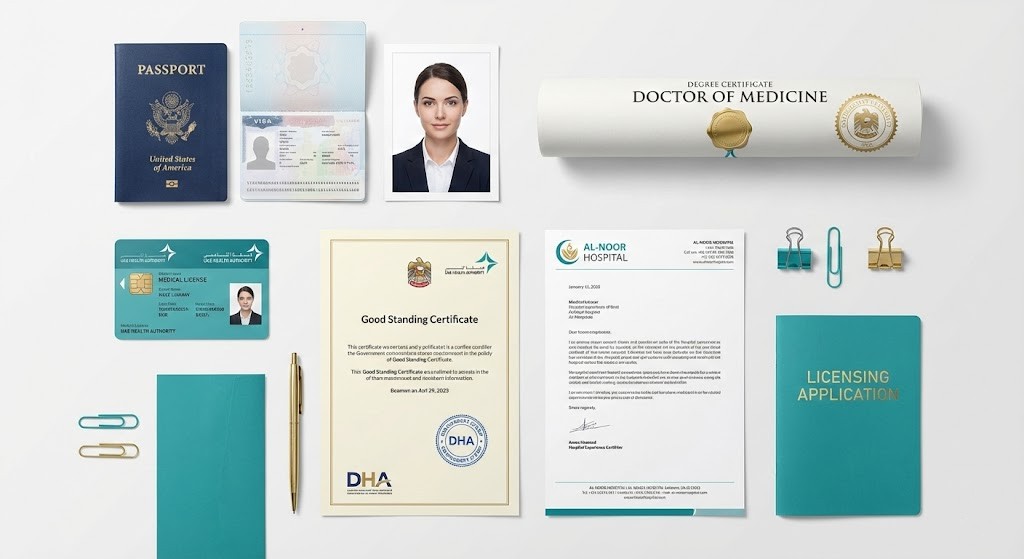
Essential Documents for All Healthcare Professionals
All healthcare professionals must submit specific core documents for DataFlow verification:
- Passport: Valid for at least 6 months, with clear scans of front and back pages
- Professional Photograph: Recent (within 6 months), white background, UAE visa photo standards
- Educational Degrees: Scanned copies of all degrees and diplomas
- Academic Transcripts: Complete transcripts showing course duration, subjects, and grades
- Professional License: Current and valid from home country or country of last employment
- Good Standing Certificate: Issued by licensing authority, not older than 6 months
- Experience Certificates: On official letterhead with facility stamps, authorized signatures, designation, employment period, and clinical responsibilities
Missing any of these elements is a frequent cause of rejection.
Additional Requirements by Profession
For Nurses:
- Internship or house job certificates (for recent graduates)
- Clinical rotation documentation
For Doctors (Specialist/Consultant positions):
- Recognized specialty certificates (MD, MS, Fellowship)
- Postgraduate degrees
For Surgeons:
- Surgical logbook (past 2 years)
- Signed and stamped by authorized personnel
- Detailed procedure names, dates, and case numbers
For Pharmacists:
- 4-year Bachelor of Pharmacy degree (BPharm or PharmD)
- Note: 3-year BPharm degrees may NOT be accepted by DHA
Document Quality Standards:
- High-resolution scans (minimum 300 DPI)
- Clear and legible text
- Color scans where applicable
Letter of Authorization (LOA)
The Letter of Authorization is a mandatory document granting DataFlow Group permission to contact your educational institutions, previous employers, and licensing authorities directly for verification purposes.
You can sign the LOA digitally through the DataFlow portal or print, manually sign, scan, and upload it.
Common LOA mistakes include unsigned documents, signatures that don’t match passport signatures, and outdated LOA templates. Always download the current template from the DataFlow portal to ensure compliance with 2026 requirements.
DHA DataFlow Fees and Payment Structure
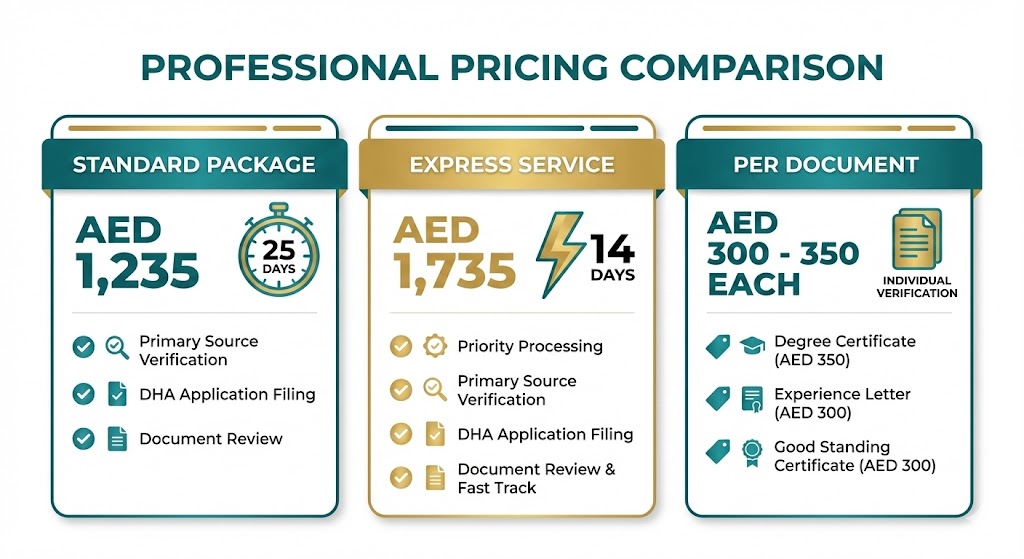
Standard Fee Breakdown
DataFlow charges a flat rate of AED 1,235 for the standard DHA verification package, which covers Primary Source Verification of standard required documents. Alternatively, you may encounter per-document pricing ranging from AED 300 to AED 350 per document, depending on the package selected and the number of credentials requiring verification.
Some educational institutions or licensing bodies charge issuing authority fees to release verification details to DataFlow. These additional fees vary by institution and appear on the DataFlow portal when you select your issuing authority during application.
You may need to pay these fees directly to the issuing authority or through the DataFlow portal, depending on the authority’s specific requirements and payment infrastructure.
Express Service Options
DataFlow offers express processing for professionals with urgent licensing timelines. The express service costs an additional AED 500 above standard fees and delivers verification results in 14 working days compared to the standard 25 working days.
Express service is particularly valuable when you have a confirmed job offer with a specific start date, face expiring qualifications or licenses that need verification before renewal, or encounter unexpected delays requiring faster processing. Premium service features include dedicated support, application error prevention, and expedited communication with issuing authorities, ensuring your verification progresses smoothly without common pitfalls that delay standard applications.
How to Avoid Additional Charges?
Submit complete and accurate documents at the time of initial application to prevent re-verification fees. Double-check issuing authority requirements on the DataFlow portal when selecting your institutions to avoid delays or extra charges for follow-ups.
If you’ve completed DataFlow verification for another regulator and the documents meet DHA requirements, you may reuse them to save time and money. Contact DataFlow support to confirm eligibility for document reuse.
DataFlow offers one free re-verification opportunity if you raise an appeal disagreeing with a discrepancy or “Unable to Verify” status. However, additional charges apply if the re-verification requires new documents or information. File appeals promptly to minimize costs and delays.
DHA DataFlow Process: Step-by-Step Guide
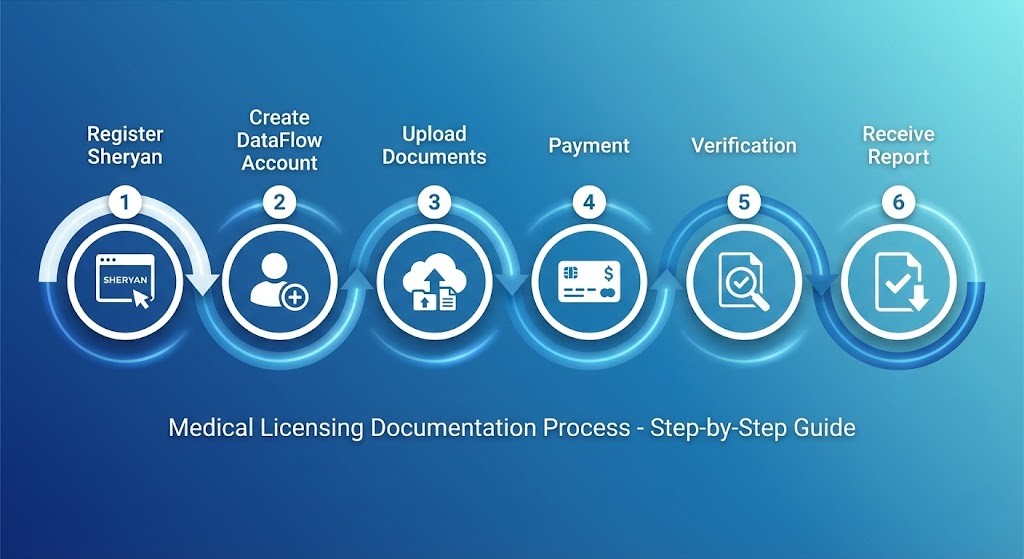
Step 1: Register on Sheryan Portal
Visit the DHA Sheryan portal and create an account by providing your complete personal information. After registration, use the Self-Assessment Tool to determine if you meet the Unified Healthcare Professional Qualification Requirements (PQR) for your desired position.
The self-assessment tool evaluates your education, experience, and qualifications against DHA standards. Upon successful assessment, you receive a DHA Unique ID number.
Record this carefully as it’s required for your DataFlow application.
Step 2: Create DataFlow Account
Navigate to dha.dfgateway.com and create your applicant profile. During registration, select “DHA Dubai” as your verification authority. This is crucial as selecting the wrong authority causes application rejection and fee loss.
Choose your healthcare role carefully from the dropdown menu, ensuring it matches your qualifications exactly. Available options include General Practitioner, Registered Nurse, Specialist Doctor, Consultant Physician, and various allied health categories depending on your specific profession and credentials. Role misselection is a common error requiring resubmission and additional fees.
Step 3: Upload Documents
Upload clear, high-resolution scans of all required documents. Fill personal and professional details with absolute accuracy, as name mismatches between documents are a top rejection reason. Ensure your name appears identically across your passport, educational certificates, and professional licenses.
Upload your signed Letter of Authorization as either a digitally signed document through the portal or a manually signed, scanned copy. Provide accurate contact information for all issuing authorities to facilitate smooth verification.
Step 4: Payment
The portal displays total fees based on your selected package and number of documents. DataFlow accepts various payment methods including credit cards, debit cards, and online banking.
Complete payment carefully and save your payment confirmation receipt. You’ll need this for tracking and any future queries.
Step 5: Verification Process
After payment, DataFlow contacts your universities, licensing bodies, and previous employers directly to verify your submitted information. This behind-the-scenes process involves official verification requests, document authentication checks, and confirmation of your employment history and qualifications.
Response time factors include your issuing authority’s responsiveness, geographic location and communication infrastructure, completeness of your submitted information, and current DataFlow processing volumes. Some institutions respond within days, while others may take several weeks depending on their internal verification protocols.
Step 6: Receive PSV Report
Once verification completes, you receive a detailed DataFlow report indicating the outcome for each document. A positive report with green verification markers means all documents successfully verified and you can proceed with DHA licensing. Once you have your positive DataFlow report, review our complete DHA licensing process guide to understand exam booking, credentialing, and final license activation steps. A negative report with red markers indicates discrepancies found in one or more documents, requiring correction or appeal.
An on-hold report means DataFlow requires additional documents or information before completing verification. Respond immediately to any insufficiency requests to prevent extended delays.
How to Check Your DHA DataFlow Status?
Three Ways to Track Application
You can monitor your application through three different methods:
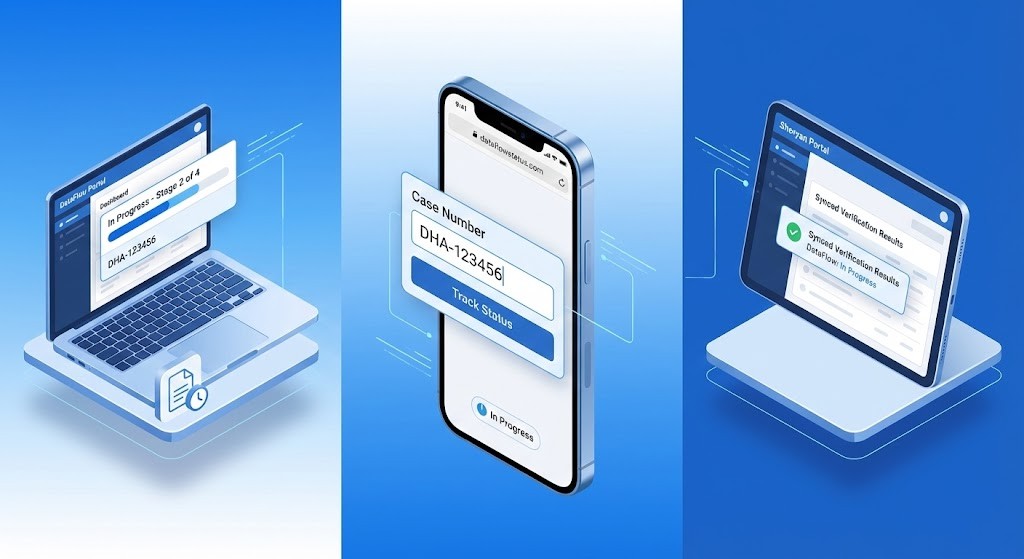
1. DataFlow Portal Login
- Visit dha.dfgateway.com
- Log into your account
- Navigate to dashboard to view active cases and current status
2. DataFlow Status Checker
- Visit www.dataflowstatus.com
- Enter your DataFlow Case Number and passport number
- Check verification status without logging in
3. Sheryan Portal Integration
- Access your Sheryan portal account
- DataFlow results automatically sync once verification completes
- Provides seamless integration between both platforms
Understanding Status Updates
When you check your application status, you’ll see one of these indicators:
“In Progress”
- PSV verification is ongoing
- DataFlow is actively contacting issuing authorities
- Typically displays for 15-45 working days
“Completed”
- Verification finished, report ready for download
- Access the dashboard immediately to review results
- Download your PSV report
“Insufficient Information”
- DataFlow requires additional documents or clarification
- Check your email for specific requests
- Respond within 24-48 hours
“Rejected”
- Verification could not be completed due to discrepancies
- Inaccurate details or failure to match issuing authority records
- Contact DHA or DataFlow support immediately for resolution
What to Do at Each Status?
When you receive insufficiency requests, respond within 24-48 hours with requested documents or information. Delays in responding extend your overall verification timeline significantly.
If your report shows discrepancies, you can request one free re-verification by raising an appeal if you disagree with the outcome. Contact DataFlow support through their official portal with your case number and provide any additional supporting documentation that clarifies the discrepancy.
Once verification completes with a positive report, download and save multiple copies of your PSV report. You’ll need this document for Sheryan portal submission, Prometric exam booking, and final DHA license activation.
DHA DataFlow Validity and Report Transfer
How Long is DataFlow Valid?
According to official DHA guidelines, PSV reports have no fixed expiration date. Previously verified documents remain on record.
However, if significant time passes between verification and license application, or if you obtain new qualifications or employment experience, you may need to verify additional documents.
The DHA Eligibility Letter issued after passing your Prometric exam remains valid for one year and is subject to renewal within three months before expiration. Prometric exam pass results remain valid for five years, allowing flexibility in your licensing timeline.
Transferring DataFlow from DHA to DOH
If you initially verified documents for DHA but later want to apply for licensure with the Department of Health Abu Dhabi (DOH) or Ministry of Health (MOHAP), you can transfer your report.
Before transferring, consider comparing UAE health authorities to understand which license best suits your career goals. The transfer process takes approximately five working days and is free for DHA reports issued post-2017.
To initiate transfer, log into your existing DataFlow account, start a new case on the dashboard, and select “Report Transfer” as your service type. Choose DOH, MOHAP, or other GCC health authorities as your new target regulator, pay any applicable transfer fees, and wait for confirmation.
Transfers to other GCC countries such as Saudi Arabia through SCFHS, Qatar through QCHP, Oman through OMSB, and Bahrain through NHRA follow similar processes but may incur additional fees depending on the destination authority and timing of your original verification.
Common DHA DataFlow Rejection Reasons (And How to Avoid Them)
Document-Related Issues
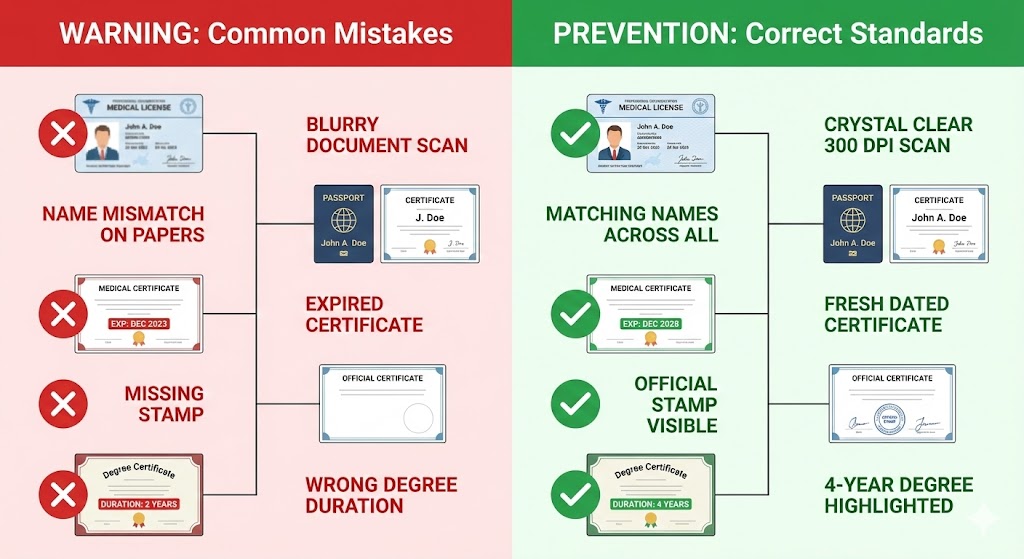
Common Document Rejection Reasons:
- Unclear or Blurry Scans: Use 300 DPI minimum, ensure documents are flat without shadows
- Name Mismatches: Name must be identical across passport, certificates, licenses, and experience letters
- Expired Good Standing Certificate: GSC must not be older than 6 months at submission
- Missing Letterheads/Stamps: All employment documents need official letterhead, HR signatures, and facility stamps
- Degree Duration Issues: Pharmacists need 4-year programs (3-year BPharm may be rejected)
How to Prevent Document Rejections:
- Use high-resolution scanning (300 DPI minimum)
- Verify name consistency before submission
- Time GSC request to remain valid throughout the process
- Ensure all employment letters have complete official formatting
Process-Related Errors
Common Application Mistakes:
- Incomplete Document Uploads: Create a complete checklist before starting, and verify all items uploaded before submission
- Unlinked Accounts: Ensure DHA ID from Sheryan matches the DataFlow application exactly
- Duplicate Applications: Use only ONE email address across all DHA and DataFlow communications
- Non-Responsive Authorities: Contact universities/employers before starting DataFlow to alert them
Prevention Tips:
- Create a comprehensive document checklist 2 months before the application
- Verify name consistency (obtain name change certificates if needed)
- Request a Good Standing Certificate 4 weeks before the DataFlow application
- Contact previous employers and universities in advance
- Inform the registrar’s office about the upcoming verification
Fast-Track Tips to Expedite Your DataFlow Process
Before You Apply
Document Preparation (2 months before):
- Gather all required documents
- Request replacements for missing documents
- Resolve name inconsistencies
- Obtain name change certificates if needed
- Request a fresh Good Standing Certificate
- Contact the university registrar’s office proactively
- Provide DataFlow contact info and timeline to the university
During Application
Application Best Practices:
- Use high-resolution scans (300 DPI minimum)
- Ensure crisp, legible text, stamps, and signatures
- Choose express service for urgent timelines (AED 500 extra = 14-day processing)
- Upload ALL documents simultaneously (not piecemeal)
- Provide accurate, current contact details for institutions
- Avoid outdated phone numbers or email addresses
After Submission
Active Monitoring:
- Check email daily for DataFlow communication
- Respond to insufficiency requests within 24-48 hours
- Follow up with issuing authorities if delays occur
- Track using all 3 methods: DataFlow portal, dataflowstatus.com, Sheryan portal
- Don’t miss important status updates
Frequently Asked Questions
Q1: How long does DHA DataFlow verification actually take?
Standard processing takes 15-25 working days according to DataFlow’s official timeline, but realistic timelines often extend to 30-45 working days depending on issuing authority response times and document complexity. Express service delivers results in 14 working days for an additional AED 500 fee.
Factors affecting timeline include your university’s responsiveness to verification requests, Good Standing Certificate processing time from licensing authorities, employment verification coordination with previous employers, and overall DataFlow processing volumes during peak application seasons when many candidates apply simultaneously.
Q2: Can I book my DHA Prometric exam before DataFlow is complete?
No, DHA requires completed DataFlow PSV verification before you can schedule your Prometric examination. You need your PSV reference number to proceed with exam booking on the Sheryan portal.
Attempting to book your exam without completed DataFlow results in application rejection and wasted time. Complete your verification first, receive your positive PSV report, then begin your DHA Prometric exam preparation to ensure you’re fully ready for testing.
Q3: Do I need to attest or apostille my documents for DataFlow?
No, DataFlow does not require document attestation or apostilling for Primary Source Verification. Clear, legible scanned copies of original documents are sufficient for the verification process.
However, check with your recruiter or DHA directly as they may have additional requirements for original document submission during final license activation. Some employers or visa processing services may require attested documents separate from the DataFlow verification.
Q4: What happens if my DataFlow report shows a discrepancy?
You can request one free re-verification by raising an appeal if you disagree with a discrepancy or “Unable to Verify” status. Contact DataFlow support immediately through their official support portal and provide your case number and passport details while explaining the discrepancy with supporting documentation, then request re-verification.
Additional charges may apply if new documents or extended verification efforts are required. If the discrepancy stems from legitimate issues with your credentials, you may need to resolve those with the issuing authority before successful verification can be completed.
Q5: Can I use the same DataFlow report for DOH or MOH licensing?
Yes, you can transfer your verified DataFlow report to DOH Abu Dhabi or MOHAP through the DataFlow portal. The transfer process takes approximately five working days and is free for DHA reports issued post-2017.
To transfer, log into your DataFlow account and start a new case, then select “Report Transfer” and choose your new target authority before submitting the transfer request.
You may need to verify additional documents if there’s a gap between your original verification and new application, or if you’ve obtained new qualifications or employment experience since your original DataFlow was completed.
Conclusion
DHA DataFlow verification is mandatory for all healthcare professionals seeking Dubai licensure, but proper preparation makes it manageable.
Key Takeaways:
- Start document collection 2 months before the application
- Choose express service (14 days, +AED 500) for urgent timelines
- Maintain name consistency across ALL credentials
- Respond to insufficiency requests within 24-48 hours
- Use high-resolution scans (300 DPI minimum)
- Contact universities/employers proactively
Document quality and accuracy matter more than speed. Resubmissions due to errors cause longer delays than careful initial preparation.
Start gathering your documents today, verify name consistency, request a fresh Good Standing Certificate, and consider express service if needed.